Steering Wheel Desk for Parked Cars: Work & Meal Tray
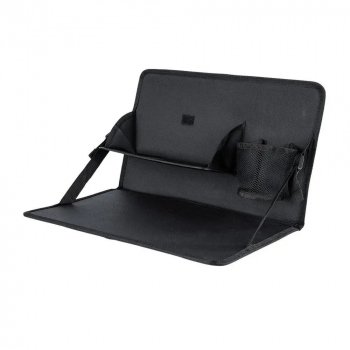
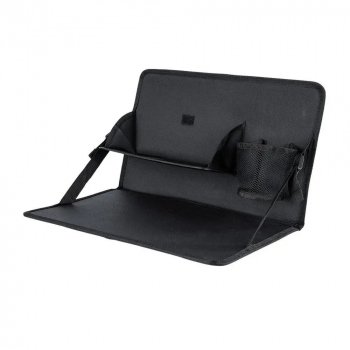
Universal Car Steering Wheel Multi-Function Desk: A Stable Work-and-Meal Surface for Parked Cars
A steering wheel desk adds a flat, usable surface inside a parked vehicle for quick meals, note-taking, laptop tasks, or organizing small items. When you’re on a commute, waiting between appointments, or taking a break on a delivery route, it can feel surprisingly hard to keep food, paperwork, and devices steady in a small cabin. A universal multi-function steering wheel desk is built to turn the driver’s seat into a more practical “mini workstation” without needing a full tray table or bulky organizer.
What a steering wheel desk does
A steering wheel desk creates a compact tabletop that sits at steering-wheel height for working, eating, or writing while parked. Instead of balancing a container on your lap or wedging a notebook against the center console, you get a flatter, more stable platform that’s easier to use for short tasks.
Many designs also include two usable sides or zones—often one side optimized for writing (flatter, more rigid) and the other better suited to meals (wider surface, sometimes with a raised edge). The goal is simple: reduce juggling and keep essentials within reach during downtime.
Common use cases (parked only)
Steering wheel desks are popular because they solve a handful of everyday “car break” problems without major setup:
- Quick meals: Supports takeout containers, snacks, or a drink placed carefully on a flat area—especially helpful when you’d rather not eat over your lap.
- Work breaks: Handles a small laptop, tablet, or clipboard for short sessions such as answering emails, reviewing schedules, or checking route plans.
- Writing and paperwork: Offers a firmer surface for forms, signatures, delivery logs, study notes, and journaling.
- Mobile organization: Keeps small essentials (pens, receipts, chargers) in one place instead of sliding around the seat or floor.
- Waiting time: A comfortable setup for reading or planning before you start driving again.
Fit and compatibility: what “universal” usually means
“Universal” typically means the desk is designed to attach to many standard steering wheel shapes and sizes—but the real-world fit depends on wheel thickness and spoke layout. The best results come from pairing it with a steering wheel that has enough clearance for the desk to hook or rest securely without slipping.
Keep in mind that some setups can cause uneven seating, such as extra-thick steering wheel covers, racing-style wheels, or unusual spoke designs. Even the texture of a cover can change how securely the desk grips. If your cabin is tight, also confirm the desk clears your seat position comfortably so your torso and arms aren’t forced into an awkward angle.
Quick compatibility checklist
| Check | Why it matters | What to do |
|---|---|---|
| Steering wheel thickness | Affects how securely the desk attaches | Remove bulky covers if the desk feels loose |
| Spoke placement | Can interfere with the desk sitting level | Rotate the wheel slightly to find a stable position while parked |
| Seat position | Determines reach and comfort | Adjust seat back/height before attaching the desk |
| Surface stability | Prevents tipping and spills | Press down lightly on edges to test before use |
Setting it up for comfort and stability
For a steering wheel desk to feel sturdy, the setup matters as much as the design. Start with the basics: park in a safe location, set the parking brake, and turn off the vehicle if appropriate for your situation.
- Center the desk and level it: Attach it so the surface sits squarely. If your vehicle has tilt or telescoping adjustment, a small change in steering wheel angle can improve leveling.
- Load from the inside out: Place heavier items closer to the steering wheel side. This reduces leverage that can tip the outer edge.
- Add grip if needed: A thin non-slip mat can help keep a tablet, mouse, or food container from sliding, especially on smoother surfaces.
- Keep controls clear: Avoid blocking essential controls and always remove the desk before driving.
Safety notes for in-car work and meals
Use a steering wheel desk only while parked. Tasks that pull attention away from driving increase crash risk, and any hard accessory left in place can become dangerous in a sudden stop. For more guidance on distraction risks, see NHTSA — Distracted Driving and CDC — Distracted Driving.
Care, cleaning, and long-term durability
Product spotlight: Universal Car Steering Wheel Multi-Function Desk
The Universal Car Steering Wheel Multi-Function Desk is designed as a compact, in-car surface for parked use—helpful for quick meals, writing, and light device work. It’s a practical option for commutes, delivery routes, campus parking lots, and road-trip stops where a stable surface makes downtime easier to manage.
At a glance
| Item | Details |
|---|---|
| Product | Universal Car Steering Wheel Multi-Function Desk |
| Price | $40.49 USD |
| Availability | In stock |
| Best for | Parked car meals, writing, light laptop/tablet use |
More in-stock picks for comfortable breaks
- Women’s Summer Pleated Linen Tank Top — A breathable option for warm-weather commutes and midday stops.
- Minimalist Loose Pleated Suit Pants — An easy, polished choice for days that mix driving, meetings, and quick in-car work sessions.
FAQ
Will a steering wheel desk fit my car?
“Universal” fits many standard steering wheels, but thickness, spoke design, and steering wheel covers can affect how level and secure it feels. Test the fit while parked, and remove bulky covers if the desk seems loose or uneven.
Can it hold a laptop safely?
It can support light laptop use while parked, but stability depends on wheel angle and how the weight is placed. Keep the laptop centered, avoid leaning heavily on the outer edge, and check that the surface doesn’t rock before typing.
Is it safe to use while driving?
No—use it only while parked and remove it before driving. Leaving it mounted can interfere with steering and increases injury risk during sudden stops.










Leave a comment